

Model Launching Instructions#
This document aims to provide a functional overview of model launching.
Download without launching#
Open a model’s deployment dialog and choose Download only beside the Deploy button. It downloads the same model artifacts used by deployment, but does not reserve GPUs, create model subprocesses, install a virtual environment, or load a model into memory.
The REST endpoint is POST /v1/cache/models. Supply cache_uid when the
client needs to query progress or cancel the operation while the POST request
is still running.
curl -X POST http://127.0.0.1:9997/v1/cache/models \
  -H 'Content-Type: application/json' \
  -d '{
    "cache_uid": "download-qwen",
    "model_name": "qwen2.5-instruct",
    "model_type": "LLM",
    "model_engine": "transformers",
    "model_format": "pytorch",
    "model_size_in_billions": "0_5",
    "quantization": "none"
  }'
Progress and cancellation use the same cache_uid:
curl http://127.0.0.1:9997/v1/cache/models/download-qwen/progress
curl -X POST http://127.0.0.1:9997/v1/cache/models/download-qwen/cancel
Cache-only downloads can also be paused and resumed:
curl -X POST http://127.0.0.1:9997/v1/downloads/download-qwen/pause
curl -X POST http://127.0.0.1:9997/v1/downloads/download-qwen/resume
Xinference persists unfinished cache-only download tasks. If the supervisor or
worker stops unexpectedly, an active task is shown as interrupted after
restart and can be resumed with the same endpoint. Resume reuses files already
present in the model hub cache. Byte-range continuation of a partially written
file depends on the selected hub client; otherwise that incomplete file is
downloaded again.
GET /v1/downloads lists active, paused, interrupted, and failed downloads.
Pause and resume apply to cache-only downloads. A model launch that happens to
be downloading still uses the launch cancellation endpoint because pausing a
launch would also need to preserve its runtime allocation state.
In a distributed deployment, worker_ip can select the worker whose local
cache receives the files. If it is omitted, the supervisor selects one worker.
Replica#
Replicas specify the number of model instances to load. For example, if you have two GPUs and each can host one replica of the model, you can set the replica count to 2. This way, two identical instances of the model will be distributed across the two GPUs. Xinference automatically load-balances requests to ensure even distribution across multiple GPUs. Meanwhile, users see it as a single model, which greatly improves overall resource utilization.
Traditional Multi-Instance Deployment:
When you have multiple GPU cards, each capable of hosting one model instance, you can set the number of instances equal to the number of GPUs. For example:
2 GPUs, 2 instances: Each GPU runs one model instance
4 GPUs, 4 instances: Each GPU runs one model instance
Added in version v1.15.0.
Introduce a new environment variable:
XINFERENCE_ALLOW_MULTI_REPLICA_PER_GPU
Control whether to enable the single GPU multi-copy feature Default value: 1
New Feature: Smart Replica Deployment
Single GPU Multi-Replica
New Support: Run multiple model replicas even with just one GPU.
Scenario: You have 1 GPU with sufficient VRAM
Configuration: Replica Count = 3, GPU Count = 1
Result: 3 model instances running on the same GPU, sharing GPU resources
Hybrid GPU Allocation
Smart Allocation: Number of replicas may differ from GPU count; system intelligently distributes
Scenario: You have 2 GPUs and need 3 replicas
Configuration: Replicas=3, GPUs=2
Result: GPU0 runs 2 instances, GPU1 runs 1 instance
Per-replica placement#
For distributed deployments, replica_config can pin every replica to a
specific worker and optional GPU indexes. Worker addresses must use the full
registered IP:port value. The number of entries must equal replica and
each entry currently supports exactly one worker.
from xinference.client import Client

client = Client("http://localhost:9997")
model_uid = client.launch_model(
    model_name="qwen2.5-instruct",
    model_engine="vllm",
    replica=2,
    replica_config=[
        {
            "replica_uid": "primary",
            "devices": [
                {
                    "worker_ip": "192.168.1.10:9978",
                    "n_gpu": 1,
                    "gpu_idx": [0],
                }
            ],
        },
        {
            "replica_uid": "secondary",
            "devices": [
                {
                    "worker_ip": "192.168.1.11:9978",
                    "n_gpu": 1,
                    "gpu_idx": [0],
                }
            ],
        },
    ],
)
The same placement can be supplied to xinference launch as a JSON array:
xinference launch \
  --model-name qwen2.5-instruct \
  --model-engine vLLM \
  --replica 2 \
  --replica-config '[{"replica_uid":"primary","devices":[{"worker_ip":"192.168.1.10:9978","n_gpu":1,"gpu_idx":[0]}]},{"replica_uid":"secondary","devices":[{"worker_ip":"192.168.1.11:9978","n_gpu":1,"gpu_idx":[0]}]}]'
--replica_config remains available as a compatibility alias, but
--replica-config is recommended. If --replica is omitted, the CLI
derives it from the number of array entries. If it is supplied explicitly, it
must equal that number.
replica_config is mutually exclusive with the model-level worker_ip,
n_gpu, and gpu_idx arguments, and with n_worker > 1. The CLI
therefore rejects --replica-config together with --worker-ip,
--gpu-idx, a non-auto --n-gpu, or --n-worker greater than 1.
Each replica currently targets exactly one worker. If replica_uid is
omitted, Xinference assigns the stable default
{model_uid}-{replica_index} (for example, my-model-0). Omit gpu_idx
and use n_gpu="auto" to let the selected worker allocate GPUs
automatically.
Running models can be scaled by one or more replicas in a single operation. The new replicas reuse the existing launch configuration by default. You can override their model engine and device allocation without changing existing replicas. Placement is optional; if omitted, the supervisor selects a worker automatically.
result = client.add_model_replica(model_uid)

scale_result = client.add_model_replica(
    model_uid,
    replica=2,
    model_engine="vllm",
    n_gpu=1,
)

result = client.add_model_replica(
    model_uid,
    replica_config={
        "replica_uid": "burst-capacity",
        "devices": [
            {
                "worker_ip": "192.168.1.12:9978",
                "n_gpu": 1,
                "gpu_idx": [1],
            }
        ],
    },
)

remaining = client.terminate_model_replica(
    model_uid, replica_id=result["replica_id"]
)
For multiple replicas, replica_config may also be a list with one placement
entry per new replica. If any replica in a multi-replica scale-up fails to
launch, Xinference rolls back the replicas created by that operation.
Scale-up is not supported for Xavier-distributed models or models launched with
n_worker > 1. Deleting the last replica terminates the running model.
GPU Allocation Strategy#
The current policy is Idle First: The scheduler always attempts to assign replicas to the least utilized GPU. Use the XINFERENCE_LAUNCH_STRATEGY parameter to choose launch strategy.
Set Environment Variables#
Added in version v1.8.1.
Sometimes, we want to specify environment variables for a particular model at runtime. Since v1.8.1, Xinference provides the capability to configure these individually without needing to set them before starting Xinference.
For Web UI.
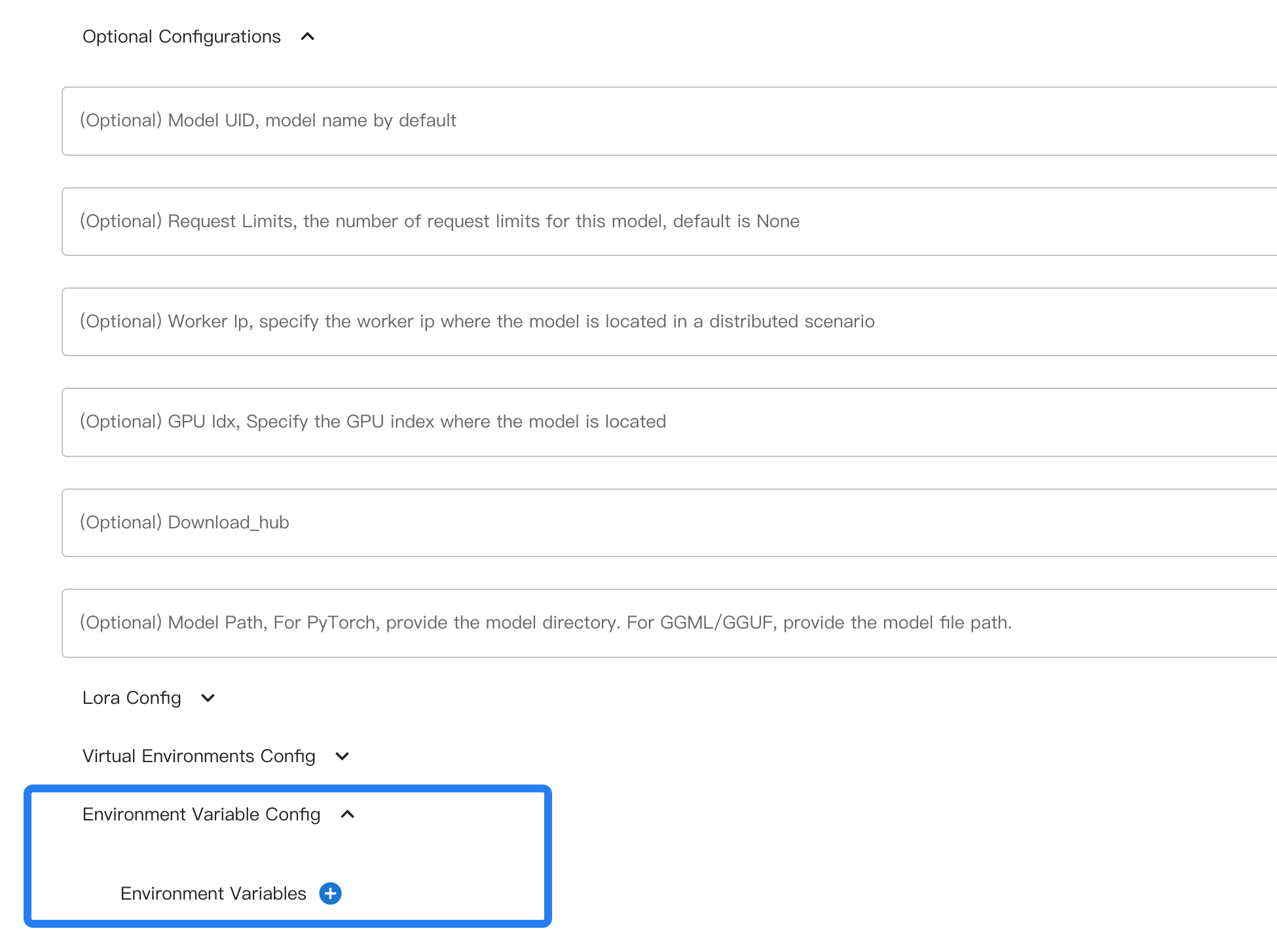
When using the command line, use --env to specify an environment variable.
Example usage:
xinference launch xxx --env A 0 --env B 1
Take vLLM as an example: it has versions V1 and V0, and by default, it automatically determines which version to use.
If you want to force the use of V0 by setting VLLM_USE_V1=0 when launching a model, you can specify this during model launching.
Configuring Model Virtual Environment#
Added in version v1.8.1.
For this part, please refer to toggling virtual environments and customizing dependencies.
Batching / Continuous Batching#
Xinference supports batching for higher throughput. For LLMs on the transformers engine,
continuous batching is available and can be enabled via environment variables at launch time.
Key settings:
XINFERENCE_BATCH_SIZEandXINFERENCE_BATCH_INTERVALfor general batching behavior.XINFERENCE_TEXT_TO_IMAGE_BATCHING_SIZEfor text-to-image models (when supported).
Example (LLM, transformers):
XINFERENCE_BATCH_SIZE=32 XINFERENCE_BATCH_INTERVAL=0.003 xinference-local --log-level debug
xinference launch -e <endpoint> --model-engine transformers -n qwen1.5-chat -s 4 -f pytorch -q none
Example (text-to-image):
XINFERENCE_TEXT_TO_IMAGE_BATCHING_SIZE=1024*1024 xinference-local --log-level debug
For detailed behavior, supported models, and aborting requests, see Continuous Batching.
Thinking Mode#
Some hybrid reasoning models (for example, Qwen3) support an optional thinking mode.
You can enable this at launch time via --enable-thinking.
Example usage:
xinference launch -n qwen3-xxx --model-engine vllm --enable-thinking
Launch Configuration History#
After a model is launched successfully from the Web UI, Xinference stores its launch configuration in the Supervisor launch-history database and keeps a user-scoped browser cache for fast access and temporary network failures. When the deployment dialog is opened again, the newest server-backed configuration is restored unless the user has already started editing the form.
The configuration history dialog can remove records owned by the current user. Records used by automatic startup are protected from deletion. In authenticated deployments, browser caches are separated by the username in the access token; configuration data owned by another user is not placed in that cache.
The history dialog also lists configurations owned by the current user for other model names. These records are never applied automatically. After the user confirms Use as Template, Xinference keeps the current model name, removes the previous model UID and history or automatic-startup metadata, and copies the remaining launch options into the form without starting a model.