Model Virtual Environments#
Added in version v1.5.0.
Background#
Some models are no longer maintained after their release, and the versions of the libraries they depend on remain outdated.
For example, the GOT-OCR2 model still relies on transformers version 4.37.2. If this library is updated to a newer version,
the model can no longer function properly. On the other hand, many newer models require the latest version of transformers.
This version mismatch leads to dependency conflicts.
Solution#
To address this issue, we have introduced the Model Virtual Environment feature.
Install requirements for this functionality via
# all
pip install 'xinference[all]'
# or virtualenv
pip install 'xinference[virtualenv]'
Enable by setting environment variable XINFERENCE_ENABLE_VIRTUAL_ENV=1.
Example usage:
# For command line
XINFERENCE_ENABLE_VIRTUAL_ENV=1 xinference-local ...

# For Docker
docker run -e XINFERENCE_ENABLE_VIRTUAL_ENV=1 ...
Warning
This feature requires internet access or a self-hosted PyPI mirror.
Xinference will by default inherit the config for current pip.
Note
The model virtual environment feature is disabled by default (i.e., XINFERENCE_ENABLE_VIRTUAL_ENV is set to 0).
It will be enabled by default starting from Xinference v2.0.0.
When enabled, Xinference will automatically create a dedicated virtual environment for each model when it is loaded, and install its specific dependencies there. This prevents dependency conflicts between models, allowing them to run in isolation without affecting one another.
Supported Models#
Currently, this feature supports the following models:
… (New models since v1.5.0 will all consider to add support)
Storage Location#
By default, the model’s virtual environment is stored under path:
Before v1.6.0: XINFERENCE_HOME / virtualenv / {model_name}
Since v1.6.0: XINFERENCE_HOME / virtualenv / v2 / {model_name}
Experimental Feature#
Skip Installed Libraries#
Added in version v1.8.1: This feature requires xoscar >= 0.7.12, which is the minimum Xoscar version required for Xinference v1.8.1.
xinference uses the uv tool to create virtual environments, with the current Python system site-packages set as the base environment.
By default, uv does not check for existing packages in the system environment and reinstalls all dependencies in the virtual environment.
This ensures better isolation from system packages but can result in redundant installations, longer setup times, and increased disk usage.
Starting from v1.8.1, an experimental feature is available:
by setting the environment variable XINFERENCE_VIRTUAL_ENV_SKIP_INSTALLED=1, uv will skip packages already available in system site-packages.
Note
The feature is currently disabled but will be enabled by default in v2.0.0.
Advantages#
Avoid redundant installations of large dependencies (e.g.,
torch+CUDA).Speed up virtual environment creation.
Reduce disk usage.
Usage#
# Enable experimental feature

# For command line
XINFERENCE_ENABLE_VIRTUAL_ENV=1 XINFERENCE_VIRTUAL_ENV_SKIP_INSTALLED=1 xinference-local ...
# For docker
docker run -e XINFERENCE_ENABLE_VIRTUAL_ENV=1 -e XINFERENCE_VIRTUAL_ENV_SKIP_INSTALLED=1 ...
Performance Comparison#
Using the CosyVoice 0.5B model as an example:
Without this feature enabled:
Installed 98 packages in 187ms
 + aiohappyeyeballs==2.6.1
 + aiohttp==3.12.13
 ...
 + torch==2.7.1
 ...
 + yarl==1.20.1
 + zipp==3.23.0
With this feature enabled:
Installed 7 packages in 12ms
 + diffusers==0.29.0
 + hf-xet==1.1.5
 + huggingface-hub==0.33.2
 + importlib-metadata==8.7.0
 + pillow==11.3.0
 + typing-extensions==4.14.0
 + urllib3==2.5.0
Model Launching: Toggle Virtual Environments and Customize Dependencies#
Added in version v1.8.1.
Starting from v1.8.1, we support toggling the virtual environment for individual model launching, as well as overriding the model’s default settings with custom package dependencies.
Toggle Virtual Environment#
When loading a model, you can specify whether to enable the model’s virtual environment. If not specified, the setting will follow the environment variable configuration.
For the Web UI, this can be toggled on or off through the optional settings switch.
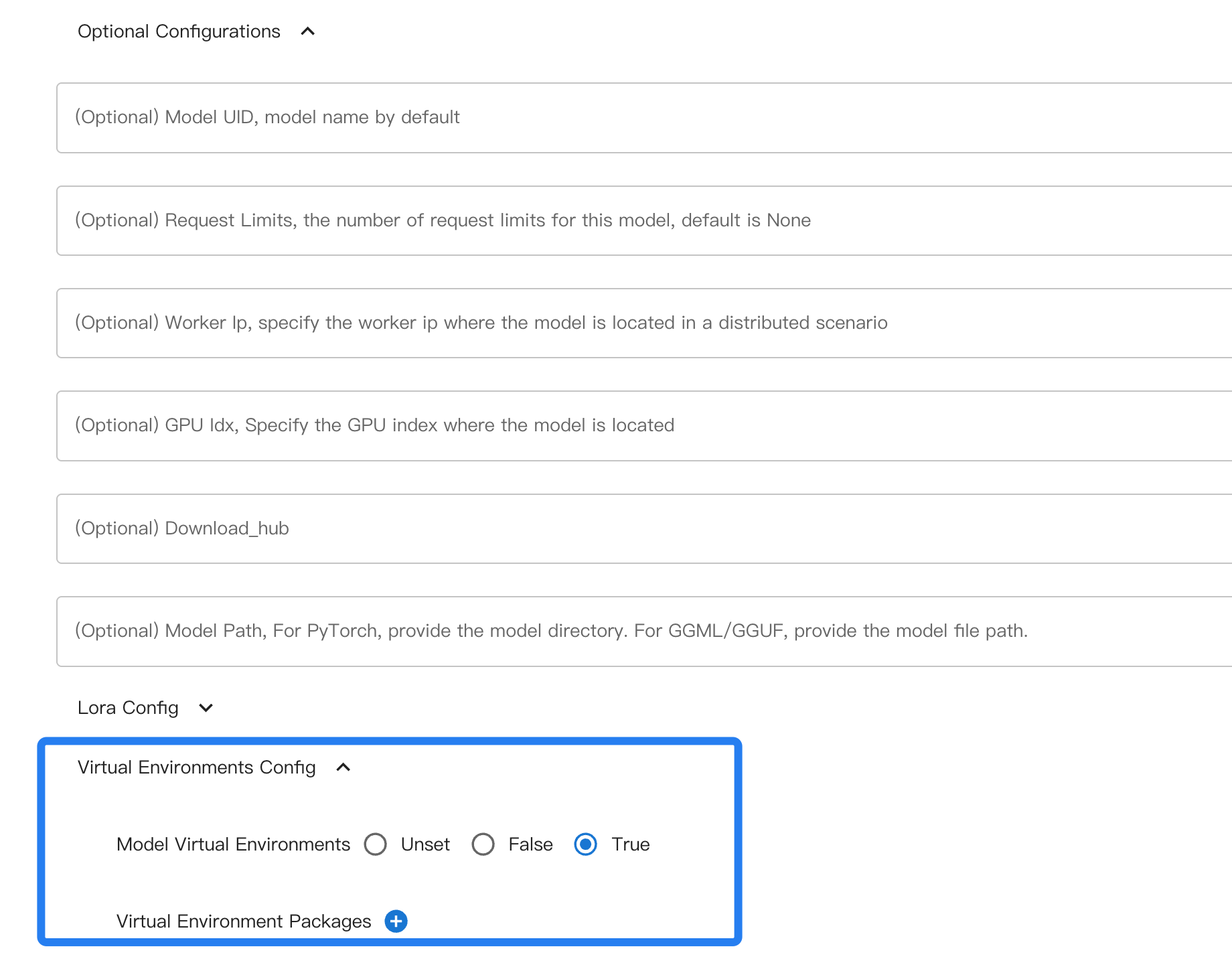
For command-line loading, use the --enable-virtual-env option to enable the virtual environment, or --disable-virtual-env to disable it.
Example usage:
xinference launch xxx --enable-virtual-env
Set Virtual Environment Package Dependencies#
For supported models, Xinference has already defined the package dependencies and version requirements within the virtual environment. However, if you need to specify particular versions or install additional dependencies, you can manually provide them during model loading.
In the Web UI, you can add custom dependencies by clicking the plus icon in the same location as the virtual environment toggle.
For the command line, use --virtual-env-package or -vp to specify a single package version.
Example usage:
xinference launch xxx --virtual-env-package transformers==4.54.0
In addition to the standard way of specifying package dependencies, such as transformers==xxx, Xinference also supports some extended syntax.
#system_xxx#: Using the same version as the system site packages, such as#system_numpy#, ensures that the installed package matches the system site package version of numpy. This helps prevent dependency conflicts.