Multimodal#
Learn how to process images and audio with LLMs.
Vision#
With the vision ability you can have your model take in images and answer questions about them.
Within Xinference, this indicates that certain models are capable of processing image inputs when conducting
dialogues via the Chat API.
Supported models#
The vision ability is supported with the following models in Xinference:
qwen-vl-chat
deepseek-vl-chat
omnilmm
cogvlm2
MiniCPM-Llama3-V 2.5
glm-edge-v
Quickstart#
Images are made available to the model in two main ways: by passing a link to the image or by passing the base64 encoded image directly in the request.
Example using OpenAI Client#
import openai

client = openai.Client(
    api_key="cannot be empty",
    base_url=f"http://<XINFERENCE_HOST>:<XINFERENCE_PORT>/v1"
)
response = client.chat.completions.create(
    model="<MODEL_UID>",
    messages=[
        {
            "role": "user",
            "content": [
                {"type": "text", "text": "What’s in this image?"},
                {
                    "type": "image_url",
                    "image_url": {
                        "url": "http://i.epochtimes.com/assets/uploads/2020/07/shutterstock_675595789-600x400.jpg",
                    },
                },
            ],
        }
    ],
)
print(response.choices[0])
Uploading base 64 encoded images#
import openai
import base64

# Function to encode the image
def encode_image(image_path):
with open(image_path, "rb") as image_file:
    return base64.b64encode(image_file.read()).decode('utf-8')

# Path to your image
image_path = "path_to_your_image.jpg"

# Getting the base64 string
b64_img = encode_image(image_path)

client = openai.Client(
    api_key="cannot be empty",
    base_url=f"http://<XINFERENCE_HOST>:<XINFERENCE_PORT>/v1"
)
response = client.chat.completions.create(
    model="<MODEL_UID>",
    messages=[
        {
            "role": "user",
            "content": [
                {"type": "text", "text": "What’s in this image?"},
                {
                    "type": "image_url",
                    "image_url": {
                        "url": f"data:image/jpeg;base64,{b64_img}",
                    },
                },
            ],
        }
    ],
)
print(response.choices[0])
Limiting Images Per Prompt#
For vision models using the VLLM backend, you can use the limit_mm_per_prompt parameter to limit the number of images that can be processed in each conversation turn. This helps control memory usage and improve performance.
# Launch model with image count limitation using Python client
from xinference.client import Client

client = Client("http://<XINFERENCE_HOST>:<XINFERENCE_PORT>")

# Launch model and set maximum 4 images per conversation turn
model_uid = client.launch_model(
    model_name="qwen2.5-vl-instruct",
    model_engine="vLLM",
    model_format="pytorch",
    quantization="none",
    model_size_in_billions=3,
    limit_mm_per_prompt="{\"image\": 4}"
)
Alternatively, you can launch the model using the command line:
# Launch model with image count limitation using CLI
xinference launch \
    --model-engine vLLM \
    --model-name qwen2.5-vl-instruct \
    --size-in-billions 3 \
    --model-format pytorch \
    --quantization none \
    --limit_mm_per_prompt "{\"image\":4}"
For Web UI, you can set the limit_mm_per_prompt parameter in the launch form:
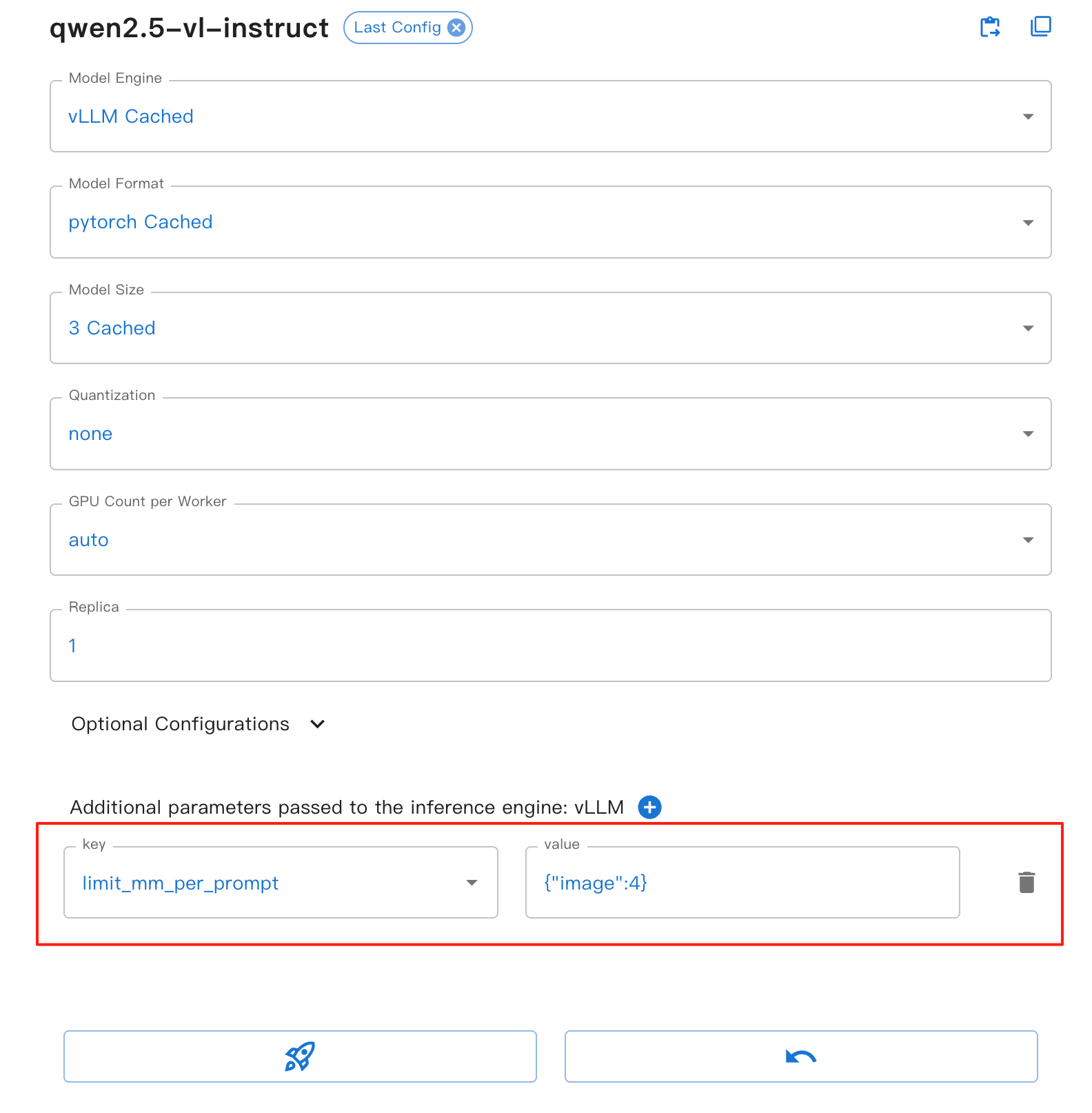
This parameter provides the following benefits:
image: Sets the maximum number of images allowed per conversation turn
Helps prevent memory overflow, especially when processing multiple images
Improves model inference stability and performance
Applies to all VLLM-based vision models
Note
The limit_mm_per_prompt parameter only takes effect when using the VLLM backend. If your model uses other backends, this parameter will be ignored.
You can find more examples of vision ability in the tutorial notebook:
Learn vision ability from a example using qwen-vl-chat
Audio#
With the audio ability you can have your model take in audio and performing audio analysis or direct textual
responses with regard to speech instructions.
Within Xinference, this indicates that certain models are capable of processing audio inputs when conducting
dialogues via the Chat API.
Supported models#
The audio ability is supported with the following models in Xinference:
Quickstart#
Audios are made available to the model in two main ways: by passing a link to the image or by passing the audio url directly in the request.
Chat with audio#
from xinference.client import Client

client = Client("http://<XINFERENCE_HOST>:<XINFERENCE_PORT>")
model = client.get_model(<MODEL_UID>)

messages = [
    {"role": "system", "content": "You are a helpful assistant."},
    {
        "role": "user",
        "content": [
            {
                "type": "audio",
                "audio_url": "https://qianwen-res.oss-cn-beijing.aliyuncs.com/Qwen2-Audio/audio/glass-breaking-151256.mp3",
            },
            {"type": "text", "text": "What's that sound?"},
        ],
    },
    {"role": "assistant", "content": "It is the sound of glass shattering."},
    {
        "role": "user",
        "content": [
            {"type": "text", "text": "What can you do when you hear that?"},
        ],
    },
    {
        "role": "assistant",
        "content": "Stay alert and cautious, and check if anyone is hurt or if there is any damage to property.",
    },
    {
        "role": "user",
        "content": [
            {
                "type": "audio",
                "audio_url": "https://qianwen-res.oss-cn-beijing.aliyuncs.com/Qwen2-Audio/audio/1272-128104-0000.flac",
            },
            {"type": "text", "text": "What does the person say?"},
        ],
    },
]
print(model.chat(messages))