

图像#

学习如何使用 Xinference 生成图像。

介绍#

Images API提供了两种与图像交互的方法:

  • 文生图端点根据文本从零开始创建图像。

  • 图生图端点允许您生成给定图像的变体。

API 端点

OpenAI 兼容端点

Text-to-Image API

/v1/images/generations

Image-to-image API

/v1/images/variations

支持的模型列表#

Text-to-image API 在 Xinference 中支持以下模型:

  • sd-turbo

  • sdxl-turbo

  • stable-diffusion-v1.5

  • stable-diffusion-xl-base-1.0

  • sd3-medium

  • sd3.5-medium

  • sd3.5-large

  • sd3.5-large-turbo

  • FLUX.1-schnell

  • FLUX.1-dev

  • Kolors

  • hunyuandit-v1.2

  • hunyuandit-v1.2-distilled

  • cogview4

  • Qwen-Image

  • GLM-Image

  • Ideogram4

  • HiDream-O1-Image

  • HiDream-O1-Image-Dev

  • HiDream-O1-Image-Dev-2604

  • Krea-2-Raw

  • Krea-2-Turbo

Image-to-image supported models:

  • Flux.1-Kontext-dev

  • Qwen-Image-Edit

  • GLM-Image

  • HiDream-O1-Image

  • HiDream-O1-Image-Dev

HiDream-O1 runtime notes#

All three HiDream-O1 checkpoints are available from Hugging Face with revision main and ModelScope with revision master. They require an NVIDIA CUDA GPU and PyTorch 2.10 or newer. Flash Attention is optional; Xinference disables it by default for compatibility.

模型

Default steps

Usage and scheduler defaults

HiDream-O1-Image

50

Text-to-image, instruction-based editing, and multiple reference images; uses the official default scheduler.

HiDream-O1-Image-Dev

28

Text-to-image, editing, and multiple reference images; single-reference editing uses the flow-matching scheduler, while text-to-image and multi-reference generation use the flash scheduler.

HiDream-O1-Image-Dev-2604

28

Text-to-image only; uses the checkpoint's float32 loading and sampling defaults.

Image engines#

Text-to-image models run on the diffusers engine by default. On Linux with NVIDIA GPUs, the following models can also run on the SGLang engine (powered by sglang-diffusion) or the vLLM engine (powered by vllm-omni) for faster inference:

  • FLUX.1-dev

  • GLM-Image (SGLang only)

  • Krea-2-Raw (SGLang only)

  • Krea-2-Turbo (SGLang only)

  • Qwen-Image

  • Qwen-Image-2512

  • Z-Image

  • Z-Image-Turbo

  • sd3.5-medium (vLLM only)

On the vLLM engine, models whose vllm-omni pipeline supports request-level batching (e.g. sd3.5-medium, Qwen-Image, FLUX.1-dev) can additionally batch concurrent requests on the GPU; pass max_num_seqs at launch to set the maximum batch size.

SGLang 0.5.20 及更新版本支持并发图片请求的原生动态批处理。启动时设置 batching_max_size,并可选设置 batching_delay_ms。vLLM-Omni 0.28 使用 max_num_seqs;支持的管线还可通过 step_execution=true 启用实验性连续批处理。批处理需显式启用,要求模型支持且请求参数兼容,并会增加 GPU 显存占用。请并发发送独立 API 请求;n 仅控制单个请求的输出数量。

安装带 diffusion 支持的 SGLang:pip install 'sglang[diffusion]>=0.5.20,<0.6',或安装主次版本匹配的 vLLM-Omni 和 vLLM:pip install 'vllm-omni==0.28.*' 'vllm==0.28.*',然后使用 --model-engine SGLang 或 --model-engine vLLM 启动模型,例如:

xinference launch --model-name Z-Image-Turbo --model-type image --model-engine SGLang
xinference launch --model-name Z-Image-Turbo --model-type image --model-engine vLLM

Note that GGUF quantization, Lightning acceleration, LoRA and controlnet are only available on the diffusers engine.

Ideogram4#

Ideogram4 uses the NF4 checkpoint and requires an NVIDIA CUDA GPU. The checkpoint is distributed under the Ideogram 4 Non-Commercial Model Agreement, and its repositories are gated. Accept the license and authenticate with the selected model hub before launching.

Ideogram4 accepts plain text prompts, but serialized structured JSON captions provide the best quality and control.

To download from ModelScope for an individual launch:

xinference launch --model-name Ideogram4 --model-type image --download_hub modelscope

GLM-Image#

GLM-Image supports both text-to-image generation and single- or multi-reference image-to-image generation through the same GlmImagePipeline. Output width and height must both be divisible by 32.

The diffusers engine uses diffusers==0.38.0 and transformers==5.0.0. Xinference installs these packages automatically when per-model virtual environments are enabled.

The Hugging Face source is zai-org/GLM-Image at revision main. The ModelScope source is ZhipuAI/GLM-Image at revision master.

To download from ModelScope for an individual launch:

xinference launch --model-name GLM-Image --model-type image --download_hub modelscope

On Linux with NVIDIA GPUs, text-to-image generation can also use SGLang:

xinference launch --model-name GLM-Image --model-type image --model-engine SGLang

The SGLang engine currently exposes only text-to-image generation. Use the default diffusers engine for image-to-image generation.

快速入门#

文生图#

可以通过 cURL、OpenAI Client 或 Xinference 的方式尝试使用 Text-to-image API。

curl -X 'POST' \
  'http://<XINFERENCE_HOST>:<XINFERENCE_PORT>/v1/images/generations' \
  -H 'accept: application/json' \
  -H 'Content-Type: application/json' \
  -d '{
    "model": "<MODEL_UID>",
    "prompt": "an apple",
  }'

图生图#

图生图 API 模拟了 OpenAI 的 图像变体创建 API。我们可以通过 cURL、OpenAI 客户端,或 Xinference 的 Python 客户端来尝试使用图生图 API:

curl -X 'POST' \
  'http://<XINFERENCE_HOST>:<XINFERENCE_PORT>/v1/images/variations' \
  -F model=<MODEL_UID> \
  -F image=@xxx.jpg \
  -F prompt="an apple"

大型图像模型(例如 SD3-Medium、FLUX.1)的内存优化#

备注

从 v0.16.1 开始,Xinference 默认对大图像模型如 Flux.1 和 SD3.5 系列开启量化。如果你使用新于 v0.16.1 的 Xinference 版本,你不需要做什么事情来在小 GPU 显存的机器上来运行这些大型图像模型。

有用的传递给加载模型的额外参数包括:

  • --cpu_offload True:指定 True 会在推理过程中将模型的组件卸载到 CPU 上以节省内存,这会导致推理延迟略有增加。模型卸载仅会在需要执行时将模型组件移动到 GPU 上,同时保持其余组件在 CPU 上

  • --quantize_text_encoder <text encoder layer>:我们利用 bitsandbytes 库加载并量化 T5-XXL 文本编码器至8位精度。这使得你能够在仅轻微影响性能的情况下继续使用全部文本编码器。

  • --text_encoder_3 None,对于 sd3-medium,移除在推理过程中内存密集型的47亿参数T5-XXL文本编码器可以显著降低内存需求,而仅造成性能上的轻微损失。

  • --transformer_nf4 True :使用 nf4 量化 transformer。

  • --quantize :只对 Mac 上的 MLX 引擎生效,Flux.1-dev 和 Flux.1-schnell会在 Mac 上使用 MLX 引擎计算,quantize 可以用来量化模型。

对于 WebUI,只需要添加额外参数,比如,添加 key cpu_offload 以及值 True 来开启 CPU 卸载。

如下列出了从 v0.16.1 开始默认使用的参数。

模型

quantize_text_encoder

quantize

transformer_nf4

FLUX.1-dev

text_encoder_2

True

False

FLUX.1-schnell

text_encoder_2

True

False

sd3-medium

text_encoder_3

N/A

False

sd3.5-medium

text_encoder_3

N/A

False

sd3.5-large

text_encoder_3

N/A

True

sd3.5-large-turbo

text_encoder_3

N/A

True

Qwen-Image

text_encoder

N/A

False

Qwen-Image-Edit

text_encoder

N/A

False

备注

如果你想关闭某些量化,只需要设置相应的选项为 False。比如,对于 Web UI,设置 key quantize_text_encoder 和值 False,或对于命令行,指定 --quantize_text_encoder False 来关闭 text encoder 的量化。

对于 CogView4,我们发现量化对模型的影响较大。因此,当显存有限时,我们推荐在 Web UI 中启用 CPU offload 选项,在命令行加载模型时指定 --cpu_offload True。

GGUF 文件格式#

GGUF 文件格式为 transformer 模块提供了丰富的量化选项。要使用 GGUF 文件,你可以在 Web 界面上指定额外选项 gguf_quantization ,或者在命令行指定 --gguf_quantization ,以为 Xinference 内建支持 GGUF 量化的模型开启。如下是内置支持的模型。

模型

支持 GGUF 量化格式

FLUX.1-dev

F16, Q2_K, Q3_K_S, Q4_0, Q4_1, Q4_K_S, Q5_0, Q5_1, Q5_K_S, Q6_K, Q8_0

FLUX.1-schnell

F16, Q2_K, Q3_K_S, Q4_0, Q4_1, Q4_K_S, Q5_0, Q5_1, Q5_K_S, Q6_K, Q8_0

sd3.5-medium

F16, Q3_K_M, Q3_K_S, Q4_0, Q4_1, Q4_K_M, Q4_K_S, Q5_0, Q5_1, Q5_K_M, Q5_K_S, Q6_K, Q8_0

sd3.5-large

F16, Q4_0, Q4_1, Q5_0, Q5_1, Q8_0

sd3.5-large-turbo

F16, Q4_0, Q4_1, Q5_0, Q5_1, Q8_0

Qwen-Image

F16, Q3_K_M, Q3_K_S, Q4_0, Q4_1, Q4_K_M, Q4_K_S, Q5_0, Q5_1, Q5_K_M, Q5_K_S, Q6_K, Q8_0

Qwen-Image-Edit

Q2_K, Q3_K_M, Q3_K_S, Q4_0, Q4_1, Q4_K_M, Q4_K_S, Q5_0, Q5_1, Q5_K_M, Q5_K_S, Q6_K, Q8_0

Qwen-Image-Edit-2509

Q2_K, Q3_K_M, Q3_K_S, Q4_0, Q4_1, Q4_K_M, Q4_K_S, Q5_0, Q5_1, Q5_K_M, Q5_K_S, Q6_K, Q8_0

备注

我们强烈推荐在 WebUI 上开启额外选项 cpu_offload 并指定为 True,或对命令行,指定 --cpu_offload True。

例如:

xinference launch --model-name FLUX.1-dev --model-type image --gguf_quantization Q2_K --cpu_offload True

使用 Q2_K 量化,你只需要大约 5GB 的显存来运行 Flux.1-dev。

对于非内建支持 GGUF 量化的模型,或者你希望自己下载 GGUF 文件,你可以在 Web UI 指定额外选项 gguf_model_path 或者用命令行指定 --gguf_model_path /path/to/model_quant.gguf 。

Lightning LORA 支持#

Lightning LORA 以 LoRA 的形式对模型进行蒸馏,在保持模型性能的同时减少推理步数,并大幅提升推理速度。以下模型目前支持该 LoRA:

模型

支持的 Lightning 版本

Qwen-Image

4steps-V1.0-bf16, 4steps-V1.0, 8steps-V1.0, 8steps-V1.1-bf16, 8steps-V1.1

Qwen-Image-Edit

4steps-V1.0-bf16, 4steps-V1.0, 8steps-V1.0-bf16, 8steps-V1.0

Qwen-Image-Edit-2509

4steps-V1.0-bf16, 4steps-V1.0-fp32, 8steps-V1.0-bf16, 8steps-V1.0-fp32

4 步或 8 步是指推理步数( num_inference_steps )。当指定了 lightning_version 时,Xinference 会自动设定推理步数。

使用时,可以在界面上选择 lightning 版本,或者通过命令行指定。
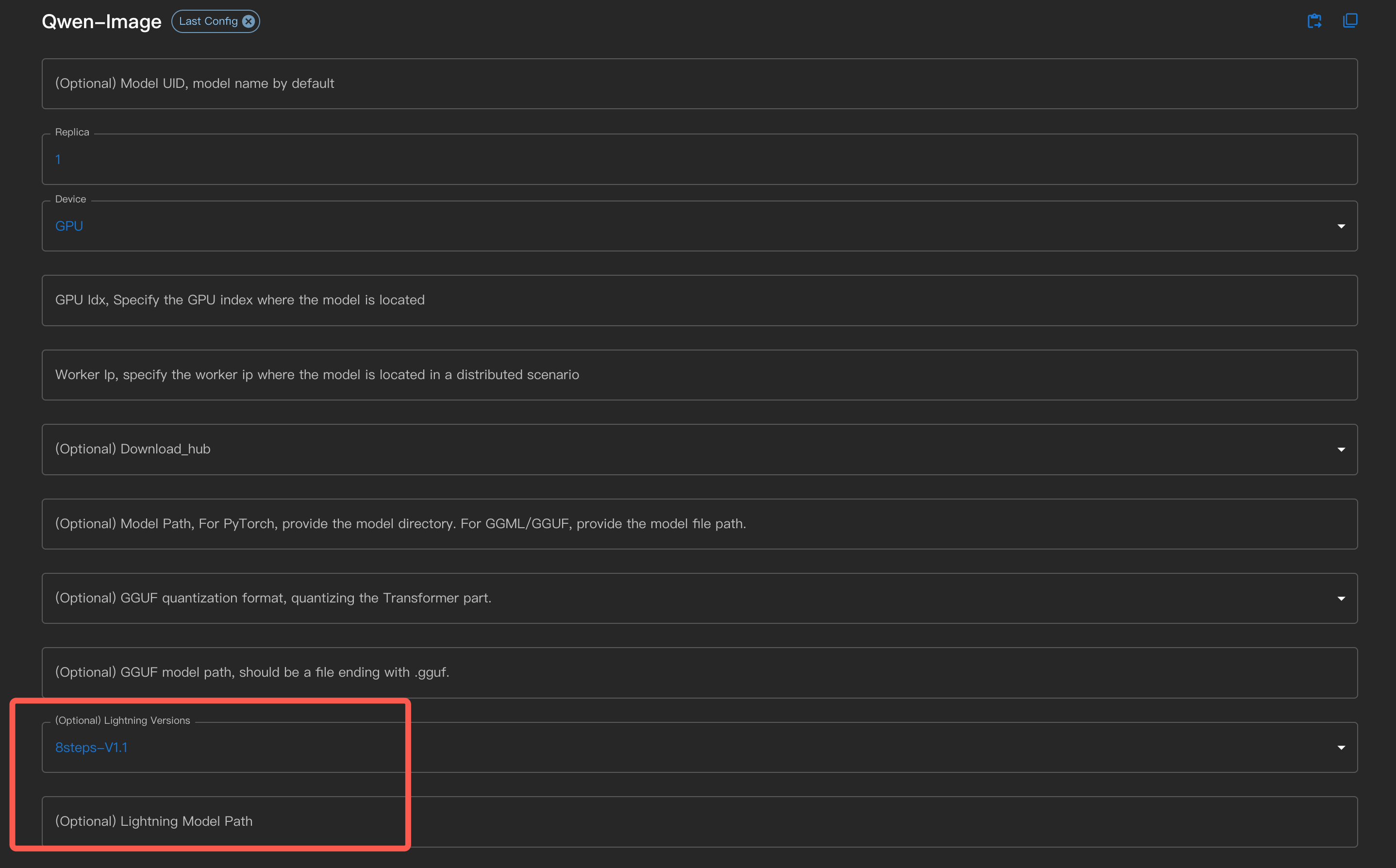
actor

在命令行中使用 --lightning_version <version>。

对于自行下载了 lightning LoRA 文件的用户,可以在界面上通过 Lightning Model Path 指定,或者使用命令行参数 --lightning_model_path 。

例如,使用 4steps-V1.0 时,推理时间从原来的 34 秒减少到 3 秒。

OCR#

The OCR API accepts image or PDF bytes and returns the OCR text.

可以通过 cURL 或 Xinference 的 Python 客户端来尝试 OCR API。

curl -X 'POST' \
  'http://<XINFERENCE_HOST>:<XINFERENCE_PORT>/v1/images/ocr' \
  -F model=<MODEL_UID> \
  -F 'kwargs={"model_size":"large"}' \
  -F image=@xxx.jpg

OvisOCR2 Usage#

OvisOCR2 is exposed through the image OCR API. Use the /v1/images/ocr endpoint above or Xinference's Python client instead of the OpenAI-compatible Chat Completions API:

from xinference.client import Client

client = Client("http://<XINFERENCE_HOST>:<XINFERENCE_PORT>")
model = client.get_model("<MODEL_UID>")
with open("document.jpg", "rb") as f:
    markdown = model.ocr(f.read())

OvisOCR2 uses deterministic decoding and allows up to 16384 new tokens by default. Its vLLM adapter also applies the recommended image pixel bounds. Visual-region <img src="images/bbox_*.jpg" /> placeholders are removed because the OCR API does not create the referenced crops, and known repeated tails are cleaned. Pass filter_imgtags=False to model.ocr to retain the raw placeholders.

PDF uploads are rasterized page by page (requires pypdfium2, included in the image extra), OCR runs on each page, and the results are merged:

  • When the model returns plain text, the page texts are joined with blank lines and the response stays a single string, same as for an image.

  • When the model returns structured results (e.g. with return_dict style options), the response is {"pages": [{"page": 1, "result": ...}, ...]}.

Two optional PDF-only kwargs fields are supported: pages (a 1-based page number or list of page numbers to OCR, defaults to all pages) and dpi (the rasterization resolution, defaults to 200, capped at 600). Pages are rasterized one at a time to keep memory usage flat; at most 200 pages can be OCRed per request (use pages to select a subset of larger documents), and a page whose raster would exceed 80 megapixels is rejected — lower dpi in that case:

curl -X 'POST' \
  'http://<XINFERENCE_HOST>:<XINFERENCE_PORT>/v1/images/ocr' \
  -F model=<MODEL_UID> \
  -F 'kwargs={"pages": [1, 2], "dpi": 300}' \
  -F image=@xxx.pdf

TeleOCR Usage#

TeleOCR uses the image OCR API with Transformers or vLLM. Its Hugging Face weights are StarDoc-AI/TeleOCR; the ModelScope mirror is XingChen-AGI/TeleOCR. Launch the regular weights with:

xinference launch --model-name TeleOCR --model-type image --model-engine transformers

GGUF quantizations use the older NaviDC-OCR conversion with a separate vision projector. Select one with:

xinference launch --model-name TeleOCR --model-type image --model-engine llama.cpp --model-format ggufv2 --quantization Q4_K_M

The GGUF publisher reports that these files require a patched llama.cpp build; stock llama.cpp fails with check_tensor_dims. Use a compatible patched xllamacpp build before launching. See the GGUF patch instructions.

Whole-document parsing#

Some models expose a whole-document parsing task in addition to per-page OCR. DeepDoc supports task="parse", which runs its full document pipeline — layout analysis, table structure recognition, paragraph merging and reading-order reconstruction — over an entire PDF and returns ordered document elements:

curl -X 'POST' \
  'http://<XINFERENCE_HOST>:<XINFERENCE_PORT>/v1/images/ocr' \
  -F model=<MODEL_UID> \
  -F 'kwargs={"task": "parse"}' \
  -F image=@xxx.pdf
{"task": "parse",
 "elements": [
   {"type": "table",
    "text": "<table><caption>...</caption><tr><th>...</th></tr></table>",
    "image_base64": "...",
    "metadata": {"page_number": 2, "x0": 20.0, "x1": 400.0, "top": 50.0,
                 "bottom": 200.0, "layout_type": "table", "col_id": 0,
                 "positions": [[2, 20, 400, 50, 200]]}}
 ]}

type is the detected layout type (text, title, table or figure), and text holds the element text — complete HTML in the case of tables. Coordinates in metadata accumulate across pages, so top and bottom are document-wide rather than page-relative. col_id is only present on elements the pipeline assigned to a column.

Unlike the per-page tasks, parse renders the PDF itself and needs the whole document to merge across pages, so it requires a PDF upload and does not accept pages or dpi. Two optional kwargs fields apply:

  • zoomin — the render scale, defaulting to 3 and capped at 6.

  • image_scope — which elements carry a base64-encoded PNG crop in image_base64: table_figure (the default, tables and figures only), all, or none. Every element has a crop internally, but encoding all of them inflates the response substantially, so prefer the default unless the text crops are needed too. The field is omitted for elements without a crop.

Parsing has its own size limits, and they are tighter than the per-page OCR path's. When a render finds no text anywhere in the document, DeepDoc re-renders the whole thing at three times the zoom, repeatedly, until the scale reaches 9 — so a request at zoomin=3 may end up rendering at 9.

With deepdoc-lib 0.2.2 that re-render is in practice unreachable for any document that renders at all — DeepDoc appends to its box list on every page, including an empty list for a page that yields nothing, so the len(boxes) == 0 condition it guards on only holds when there were no pages to render. The document is therefore budgeted at the scale you asked for, with a separate ceiling bounding what the re-render would cost should a later release make it reachable again. Three budgets apply:

  • Per page, enforced at the worst-case scale, since one page with an outsized MediaBox must not be admitted on the strength of a retry that may still fire: a page may not peak above 200 megapixels. An A3 page is fine at zoomin=3 but not at 6.

  • Whole document, at the requested scale: the pages together may not exceed 1 gigapixel, roughly 221 A4 pages at the default zoom, with the 200-page ceiling capping it from the other side.

  • Whole document, if the re-render happens: the escalated peak may not exceed 6 gigapixels, about 24 GB of page images. This is what limits long documents in practice — roughly 130 A4 pages at the default zoom — and it is deliberately not derived from the other two, whose product would permit some 160 GB.

Note that the per-page budget is not monotonic in zoomin, because the retry ladder is not: DeepDoc tests zoomin < 9 before multiplying, so zoomin=2 and zoomin=6 both escalate to 18x while zoomin=3 stops at 9x. Lowering zoomin can therefore make the per-page budget larger. For that reason a 400 from these limits names a zoomin that would actually fit whenever one exists, and otherwise says to split the document — follow what the message says rather than assuming a lower zoom will help.

Both whole-document ceilings can be raised on deployments whose parse workers are sized for it, via XINFERENCE_MAX_PDF_PARSE_TOTAL_PIXELS and XINFERENCE_MAX_PDF_PARSE_RETRY_TOTAL_PIXELS (both in pixels). A rendered page costs roughly 4 bytes per pixel, so the defaults correspond to about 4 GB and 24 GB of page images respectively.